iFANN
    iFANN 검색...
    로그인
    홈
    뉴스
    동영상
    사진
    GIF
    탐색
    투표
    어워드
    iFAMOUS
    위키
    애니
    룸
    알림
    메시지
    북마크
    프로필
    위키어워드iFAMOUS랭킹산업크리에이터 리워드사용자 리워드약관개인정보커뮤니티 가이드라인게시 중단 / DMCA도움말개발자

    © 2026 iFANN

    홈
    검색
    메시지
    알림
    프로필
    사진
    Timofey
    Timofey@timofey0mo
    💭Tech💭Productivity
    20 Microsoft Excel Keyboard Shortcuts

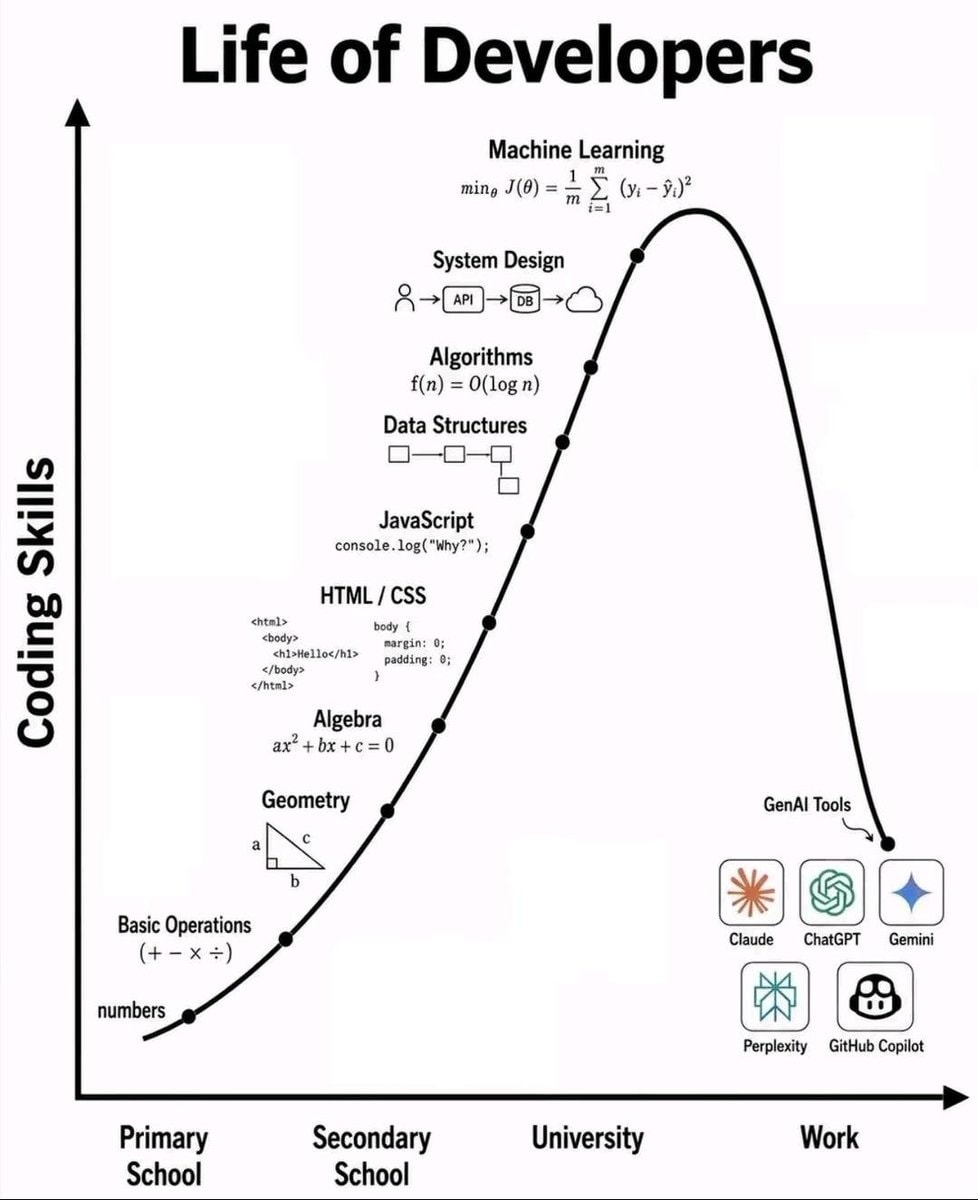
    @timofeyStop clicking around Excel! Here are 20 Microsoft Excel keyboard shortcuts to save time. Ctrl + C is for Copy and Ctrl + V is for Paste while Ctrl + X handles Cut. Hit Ctrl + Z for Undo or Ctrl + Y for Redo when needed. Save your work fast with Ctrl + S, Find anything with Ctrl + F, or use Ctrl + H for Find & Replace. Select All with Ctrl + A, jump through data using Ctrl + Arrow, and select data quickly with Ctrl + Shift + Arrow. Go to cell A1 via Ctrl + Home or reach the last used cell with Ctrl + End. Edit a cell with F2, AutoSum with Alt + =, and open Format Cells with Ctrl + 1. Insert today's date using Ctrl + ; and current time with Ctrl + Shift + :. Turn filters on or off with Ctrl + Shift + L. The image highlights creating a table with Ctrl + T. Save this post so you can come back to it later! Which Excel shortcut do you use the most? #Tech

    원본 게시물 보기

    20 Microsoft Excel Keyboard Shortcuts

    @timofey님의 사진· Aug 21, 2026· Tech

    이 사진에 대해

    The focus is a computer keyboard. Red circles highlight the "Ctrl" and "T" keys, with a red arrow connecting them. The image is a close-up, top-down shot of the keyboard's keys. The mood is instructional or informative, likely demonstrating a keyboard shortcut. The keys are standard QWERTY layout.

    Tech 사진 전체 보기

    ?

    아직 댓글이 없습니다. 첫 댓글을 남겨보세요!

    Tech 사진 더 보기

    Tech 사진 전체 보기
    Autonomous plane US flight milestone2Autonomous plane US flight milestoneLife of Developers infographicLife of Developers infographicSuperiorTrade Hyperliquid terminalSuperiorTrade Hyperliquid terminalChatGPT email screenshotChatGPT email screenshotHulk meme formatHulk meme formatVibe Coding vs Vibe Debugging memeVibe Coding vs Vibe Debugging memeWill Smith futuristic gun robotsWill Smith futuristic gun robotsTravis Scott RHYNO Spotify debut2Travis Scott RHYNO Spotify debut20 JEV Tips for Machine Decision Models20 JEV Tips for Machine Decision ModelsElon Musk Uranus joke theoryElon Musk Uranus joke theorythv collagethv collageNick Bostrom on machine intelligenceNick Bostrom on machine intelligenceElon Musk X usage recordsElon Musk X usage recordsAudio app beats ChatGPT to #2Audio app beats ChatGPT to #2Apple executive on iPhone durabilityApple executive on iPhone durabilitySecret internet life and Pocket FM milestoneSecret internet life and Pocket FM milestoneGoogle Gemini security breach alertGoogle Gemini security breach alertPS4 console updatePS4 console update
    사진
    Timofey
    Timofey@timofey0mo
    💭Tech💭Productivity
    20 Microsoft Excel Keyboard Shortcuts

    @timofeyStop clicking around Excel! Here are 20 Microsoft Excel keyboard shortcuts to save time. Ctrl + C is for Copy and Ctrl + V is for Paste while Ctrl + X handles Cut. Hit Ctrl + Z for Undo or Ctrl + Y for Redo when needed. Save your work fast with Ctrl + S, Find anything with Ctrl + F, or use Ctrl + H for Find & Replace. Select All with Ctrl + A, jump through data using Ctrl + Arrow, and select data quickly with Ctrl + Shift + Arrow. Go to cell A1 via Ctrl + Home or reach the last used cell with Ctrl + End. Edit a cell with F2, AutoSum with Alt + =, and open Format Cells with Ctrl + 1. Insert today's date using Ctrl + ; and current time with Ctrl + Shift + :. Turn filters on or off with Ctrl + Shift + L. The image highlights creating a table with Ctrl + T. Save this post so you can come back to it later! Which Excel shortcut do you use the most? #Tech

    원본 게시물 보기

    20 Microsoft Excel Keyboard Shortcuts

    @timofey님의 사진· Aug 21, 2026· Tech

    이 사진에 대해

    The focus is a computer keyboard. Red circles highlight the "Ctrl" and "T" keys, with a red arrow connecting them. The image is a close-up, top-down shot of the keyboard's keys. The mood is instructional or informative, likely demonstrating a keyboard shortcut. The keys are standard QWERTY layout.

    Tech 사진 전체 보기

    ?

    아직 댓글이 없습니다. 첫 댓글을 남겨보세요!

    Tech 사진 더 보기

    Tech 사진 전체 보기
    Autonomous plane US flight milestone2Autonomous plane US flight milestoneLife of Developers infographicLife of Developers infographicSuperiorTrade Hyperliquid terminalSuperiorTrade Hyperliquid terminalChatGPT email screenshotChatGPT email screenshotHulk meme formatHulk meme formatVibe Coding vs Vibe Debugging memeVibe Coding vs Vibe Debugging memeWill Smith futuristic gun robotsWill Smith futuristic gun robotsTravis Scott RHYNO Spotify debut2Travis Scott RHYNO Spotify debut20 JEV Tips for Machine Decision Models20 JEV Tips for Machine Decision ModelsElon Musk Uranus joke theoryElon Musk Uranus joke theorythv collagethv collageNick Bostrom on machine intelligenceNick Bostrom on machine intelligenceElon Musk X usage recordsElon Musk X usage recordsAudio app beats ChatGPT to #2Audio app beats ChatGPT to #2Apple executive on iPhone durabilityApple executive on iPhone durabilitySecret internet life and Pocket FM milestoneSecret internet life and Pocket FM milestoneGoogle Gemini security breach alertGoogle Gemini security breach alertPS4 console updatePS4 console update